- 글번호
- 43359
2026-2 The Guide for Tuition Payment & Installment (외국인)
- 수정일
- 2026.08.11
- 작성자
- 대학원
- 조회수
- 1157
- 등록일
- 2026.08.10
※ 구글 크롬 등의 브라우저를 통한 번역기능을 활용하여 본인 국가의 언어로 번역하여 보시기 바랍니다.
Please try translating into your country's language using the translation function of a browser such as Google Chrome.
2026-2 등록금납부/분납신청 안내
(The Guide for Tuition Payment & Installment)
Ⅰ. 2026-2학기 대학원 등록금 납부 안내 (The Guide for Tuition Payment)
1. 등록금 납부기간(Payment Period): 2026. 8. 21.(Fri) 10:00 ~ 2026. 8. 28.(Fri) 16:00
2. 등록금 고지서 확인가능일(Checking the Invoice Available): 2026. 8. 14.(Fri) 14:00
3. 등록금 고지서 확인방법(How to Check the Tuition Invoice)
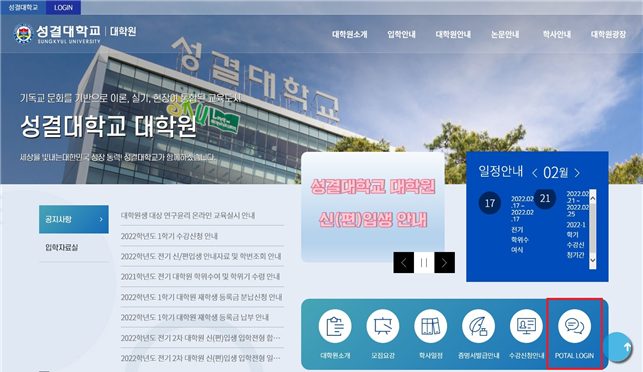
(1) 대학원 홈페이지 메인화면에서 “PORTAL LOGIN”을 클릭합니다.
Click “PORTAL LOGIN” on the main screen of the graduate school homepage.
(https://www.sungkyul.ac.kr/portalLogin/skukr/portalLoginForm.do)
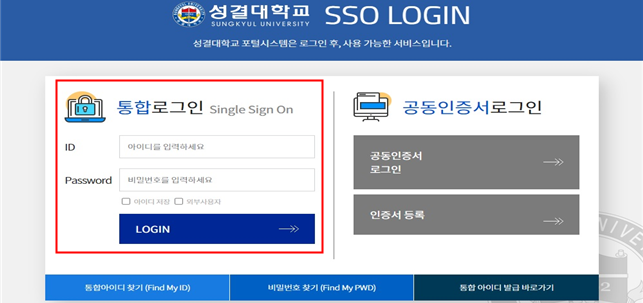
(2) 통합 ID와 비밀번호를 입력하여 로그인합니다.
Log in by entering your integrated ID and password.
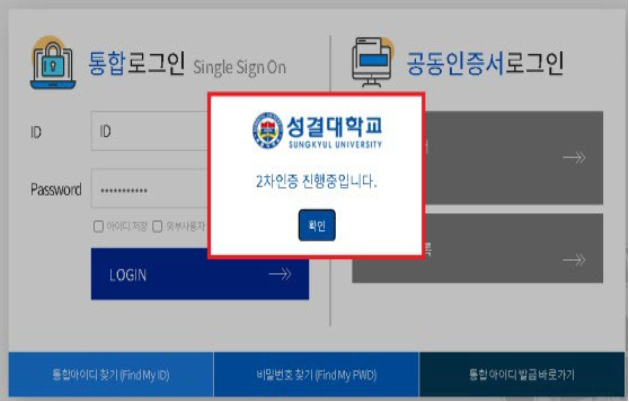
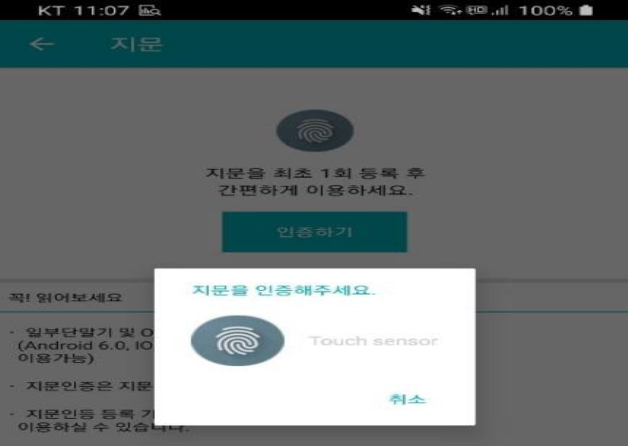
(3) 스마트폰을 통해 2차 로그인을 진행합니다. (2차 로그인 방법은 해당공지 링크 참고: https://zrr.kr/Lh5GdE)
Proceed with secondary login via your smartphone. (Check the link for the secondary login method)
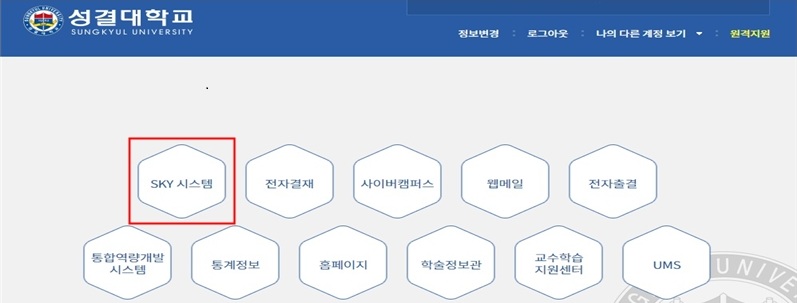
(4) SKY시스템을 클릭하여 접속합니다.
Click on the SKY system to access it.
(5) “등록정보” → “개인고지서발행” 을 클릭하여 실납입액과 가상계좌번호를 확인하여 납부합니다.
Click “Registration Information” → “Issue Personal Notice” to check the Actual Payment Amount and Virtual Account Number and pay correctly.
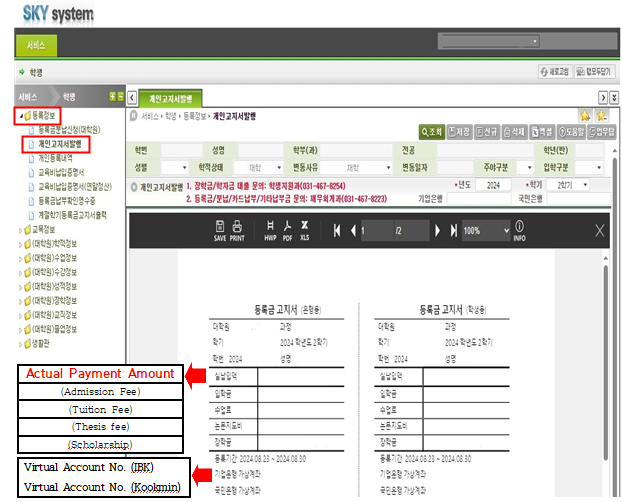
※ 분납신청을 한 경우(분납신청방법은 아래글 참고), 선택상자에서 해당 라운드를 선택한 후 조회버튼을 눌러서 정확한 금액을 확인하고 납부해야 함.(매 차수마다 금액이 상이할 수 있음)
If you have applied for installment payment(Please check the article below for "How to Apply for Installment"), you must select the appropriate round from the selecting box and click the search button to check the exact amount and pay. (The amount may vary for each installment)
Ⅱ. 2026-2학기 분납신청 안내 (The Guide for Installment)
※ 분납기간 미준수가 빈번히 발생함에 따라 분납횟수가 조정되었음. 외국인 유학생의 분납은 2회까지만 가능함.(우즈벡만 3회까지 가능).
The number of installment payments has been adjusted due to frequent non-compliance with the payment period. International students are allowed up to two installments.(up to three for Uzbekistan students only).
1. 분납기간(Application Period for Installment): 2026. 8. 14.(Fri) 14:00 ~ 2026. 8. 18.(Tue) 16:00
※ 기간 이후 절대 신청불가(Applications cannot not be accepted after the deadline.)
2. 납부기간(Payment Period Each)
- 1회차 : 2026. 8. 21.(Fri) 10:00 ~ 2026. 8. 28.(Fri) 16:00
- 2회차 : 2026. 9. 22.(Tue) 9:00 ~ 2026. 9. 28.(Mon) 16:00
(3회차 : 2026. 10. 20.(Tue) 9:00 ~ 2026. 10. 26.(Mon) 16:00 ※ Uzbekistan only)
3. 분할횟수선택(Select Number of Installments): 2 times of Round
(※ Up to 3 times is available only for Uzbekistan.)
4. 분납신청 방법(How to Apply for Installment Payments)
* 포탈로그인 후 SKY시스템 접속 (※ 위 글의 (1)~(4) 참고)
After logging into the portal, access the SKY system (※ Refer to (1)~(4) steps above "How to Check the Tuition Invoice")
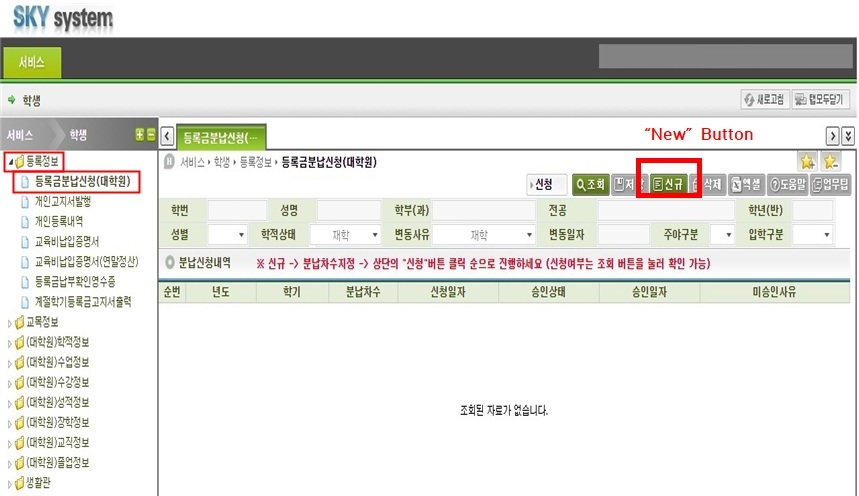
(1) “등록정보” → “등록금분납신청(대학원)” 을 클릭한 후, “신규” 버튼을 클릭한다.
Click “Registration Information” → “Request for Tuition Installment Payment”. Then Click “New” Button.
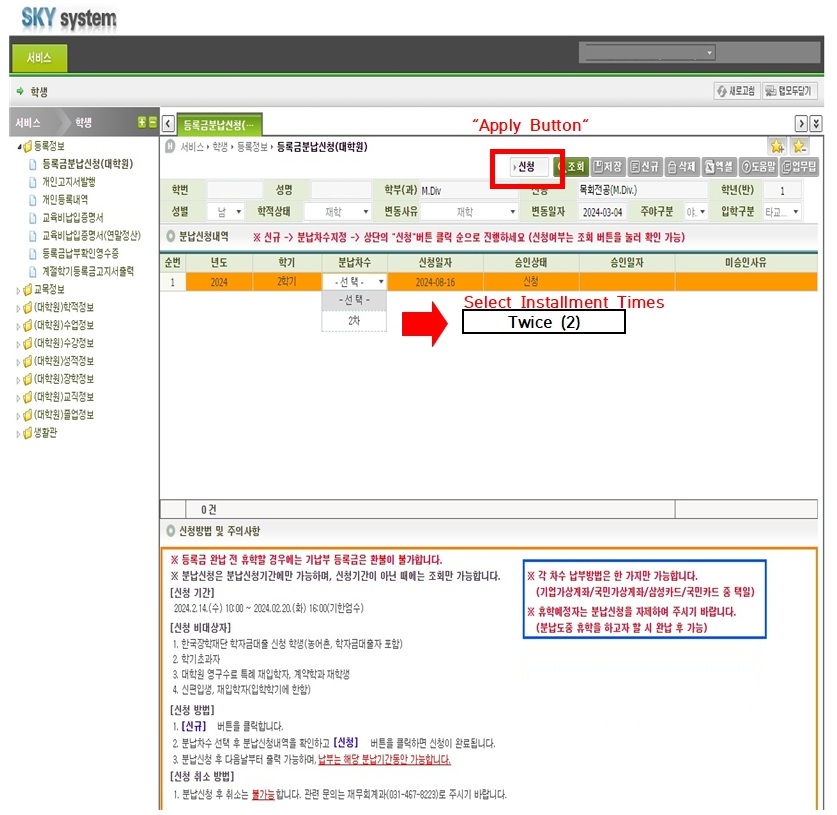
(2) “분납차수”를 클릭하여 본인이 원하는 차수를 선택한 후, “신청” 버튼을 클릭한다.
Click on “Installation Times” to select the times you want and click the “Apply button”.
※ 신청 후 취소는 불가하며, 해당차수 기간에 분할금액을 반드시 납부해야 함.
Cancellation is not possible after application, and the installment amount must be paid during the applicable period.
- 첨부파일
- 첨부파일이(가) 없습니다.